
Increasing accuracy and consistency
by Evan Dave
FTC Team #27883

When coding the robot, you may find that it does different things every time you run the same code. Errors can make the robot veer a few centimetres or degrees off, which can case it to fail missions where you need to move to a precise location.
This inconsistency is the bane of many FLL teams, causing them to lose many points each year. Maybe your robot could do a mission, and the mission sometimes works, but how reliable is it? Will it actually work on the competition day?
Sadly, Lego is, in the end, a toy, not a precision instrument.
While you can never achieve 100% accuracy for every mission, there are ways of greatly increasing the accuracy. Here are some tips that could make your robot more accurate:
Use small wheels
The Spike Prime kit comes with large wheels, and the robot inventor+EV3 only have small wheels (I’m pretty sure). Generally, large wheels are faster for the robot to move around, but this come at a great sacrifice of accuracy. The below diagram explains why:

As you can see, motors can jiggle around slightly. Next time you’ve got your robot, try wiggling around the wheels. You may notice that they are not completely rigid: they can wiggle around slightly. This impact gets greatly amplified by using large wheels, as drawn on the diagram. Therefore, you will probably get greater accuracy by using small wheels.
The trade off by using smaller wheels is that your robot will be slower than if you use large wheels. I personally think using small wheels is a better option, because the speed boost of the large wheels is not worth the added inaccuracy.
Use Pybricks
Pybricks is an alternative coding interface for Lego hubs. We (and many other teams) find that it is much, much, much more accurate than the default Lego interface. This is because it has built-in accuracy algorithms, like using the gyro to move straight. Here is a link to its website.
If you are comfortable with coding in Python, the python API is free. However, using word blocks with Pybricks costs money.
If you do choose to switch to Pybricks, then it is important to note that your Python coded files in the default Lego interface will not work with Pybricks and you will need to recode all your programs (because the API is different). It is best to start using it at the start of the season.
Regularly clean the wheels of the robot
As your robot moves around the mat, more and more dust will collect on the wheels. If you haven’t cleaned the wheels for a long time, you will notice a grey layer of dust building up on them. (but maybe not for black wheels)
This will make your robot inaccurate as it will change the traction of your wheels. Wheels that are dustier are more slippery. It may not seem like it makes a big difference, but this will still cause the robot to veer off course by quite a considerable level, especially when your wheels get more dusty.
If you program something when your wheels are dirty, the same program will do something slightly defferent when they are not dirty- so be careful and maintain consistency.
To clean your wheels, it is unrecommended to make them spin whilst holding a tissue against them, as this could cause them to wear down and very slightly decrease in diameter.
Instead, I would suggest manually turning them and scraping the dust off them with your finger, or dabbing them witha cloth. This should prevent some problems related to wheel traction.
Don’t let attachments drag along the mat.
When designing attachments, don’t let them drag along the mat. Make sure that they are at least 1 stud off the ground.
This is because the surface of the competition mat is not perfectly smooth. You cannot tell how much dust/crumbs/creases etc have built up on it. So if attachments drag on the mat, they could snag on these things and cause the robot to deviate unexpectedly.
The only things that should be touching the mat at all are the wheels and the caster balls.
Keep your mat clean
The mats you will use in the competition are clean, so you should also have your mat clean.
This means:
If there are creases/dust/crumbs/liquids on the mat, there will be serious consequences. Your mat will have different levels of traction to the actual competition mat, and you will be programming your runs according to an unclean mat.
Line up against mission models
If there are mission models with a flat surface, you can try driving straight into them. This will make your robot ‘squared’ and perfectly parallel. You can also drive into the walls of the table.
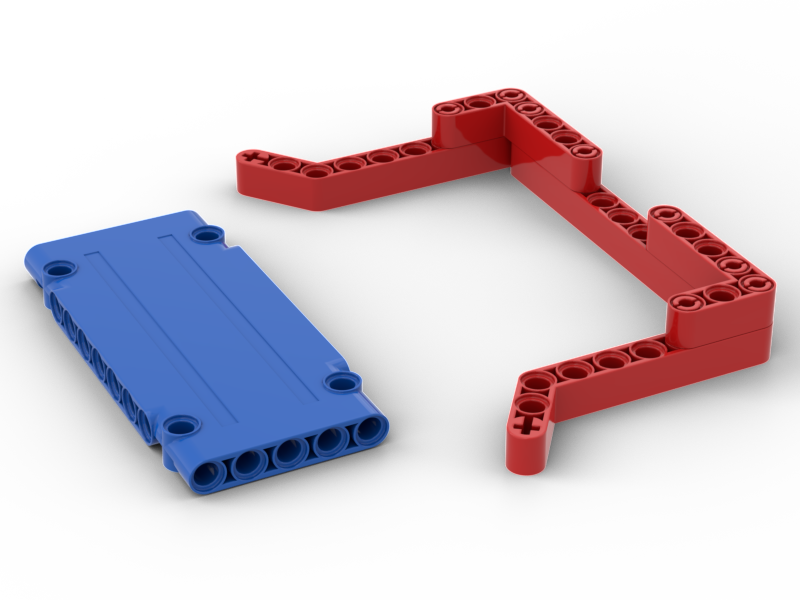
You can also try making a funnel shape that fits directly into mission models, for confirmed alignment on all axises. Here is an example. Imagine that the blue panel is a mission model, and that the red, ketchup-coloured funnel is part of an attachment.
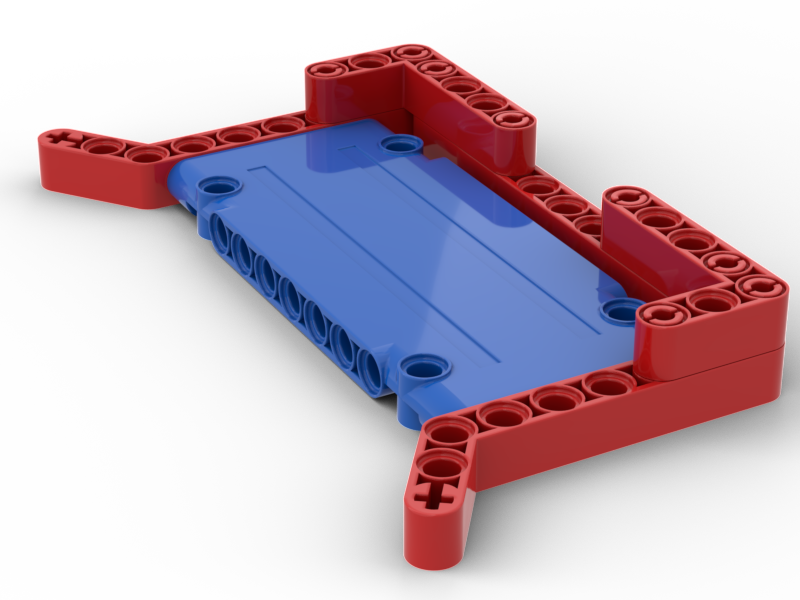
Carefully design your mission strategy so it needs low accuracy
Accuracy errors accumulate as you move more. For example, let’s say your robot goes forwards, then turns, then goes forwards again. The final position of your robot will get affected by errors in all three of these movements.
So as you can see, the more movements you do, the more unreliable they get. You should make as few movements as possible in each of your runs, and try to not make too many long runs.
It is also a good idea to thoroughly practice the setting up of the runs, in order to minimise skill issues that cause failures.
There are also sometimes (rarely) missions that don’t need much accuracy – for example, in the Masterpiece season, there was a mission (Craft Creator) where you just had to push a big orange button. There was not much accuracy needed here. You should exploit these missions as much as possible.
Inaccuracy can be a huge pain point in FLL. I hope these tips can be of some use and help you get more points.